Narita Airport Tax Refund Guide: How to Get Your Tax Refund
Since Japan introduced its new tax-free shopping system, international visitors who purchase tax-free goods must complete a customs confirmation procedure at the airport before leaving Japan.
If you are departing from Narita International Airport, this guide will walk you through the tax refund process, including where to complete customs confirmation, how to collect your refund, and where to find the refund machines in each terminal.
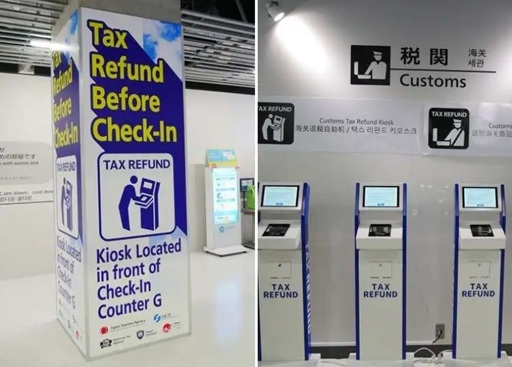
Narita Airport Tax Refund
First, bring your passport and all your tax-free purchases to the designated customs confirmation area.
You can check the locations using the following terminal maps:
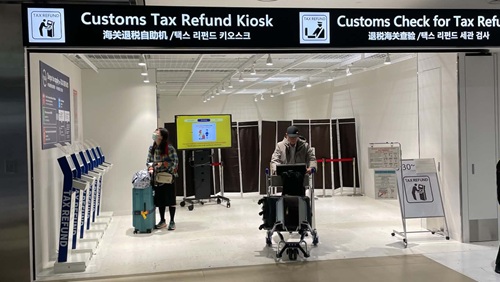
Next, go to a customs screening kiosk. Present your passport to check which inspection procedure applies to your purchases.
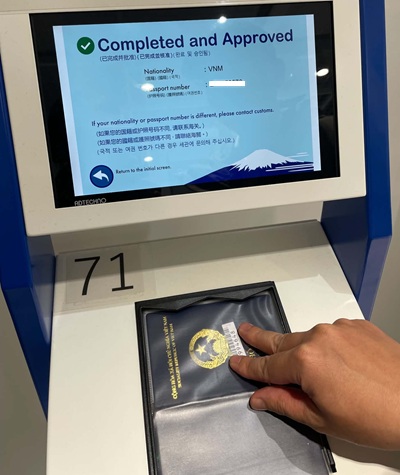
The kiosk will display one of two results:
- Green check mark: Proceed to the tax refund machines (Area 2).
- Red check mark: Take your purchases to the customs inspection counter (Area 1), where a customs officer will check them.
If you receive a red result, follow the instructions given by the customs officer.
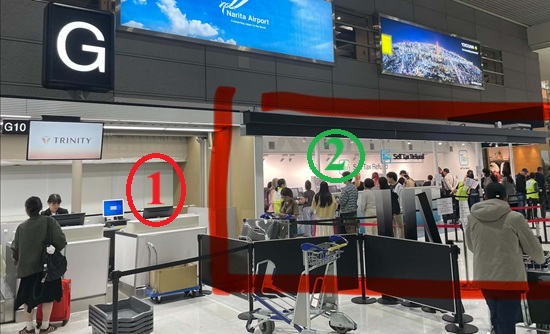
If you receive a green result, proceed to the self-service refund machine:
- Scan your passport at the designated reader (Area 1).
- Select your preferred display language (Area 2).
- Choose the cash refund option.
- Collect your money at the designated collection point (Area 3).
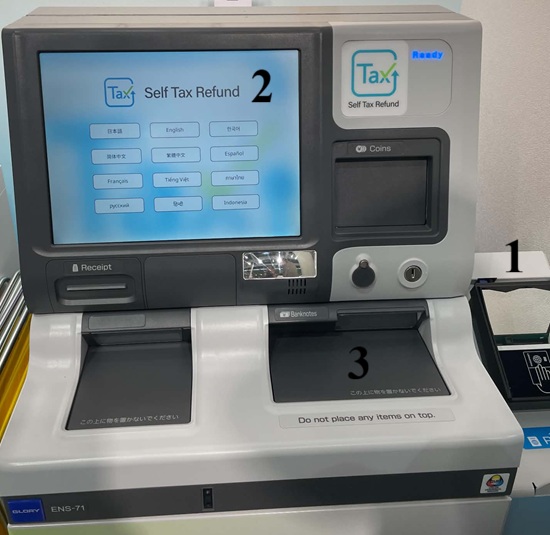
If you receive a green result and there are no long queues, the procedure may take around 15 minutes. However, we recommend arriving early in case the airport is busy or your purchases require a physical inspection.
Good news: At Narita Airport, you can receive your tax refund even after passing through security. Some Cash Japan refund machines are located in the international departure area, beyond the security checkpoint.
However, it is important to understand that there are two separate procedures:
1. Customs Confirmation and Receiving Your Tax Refund Are Two Different Procedures
MUST BE COMPLETED BEFORE SECURITY
Step 1: Customs Confirmation
- Present your passport and tax-free purchases.
- Complete the procedure using Visit Japan Web or a dedicated customs terminal.
- This step must be completed before checking in your luggage and before passing through airport security.
CAN BE COMPLETED AFTER SECURITY
Step 2: Receiving Your Tax Refund
- Use a tax refund machine or an available assistance counter.
- You may receive your refund in Japanese yen in cash from a Cash Japan machine.
- Other refund methods may be available online, depending on the store’s instructions.
Detailed Guide to the Tax Refund Process at Narita Airport
The tax refund procedure at Narita Airport consists of two main steps.
Step 1: Complete Customs Confirmation
When you arrive at the airport, make sure you have the following items with you:
- Your passport.
- All goods purchased under the tax-free shopping system.
- Any relevant purchase documents, if required.
You can complete customs confirmation using Visit Japan Web or a dedicated tax-free procedure terminal at the airport.
Important things to remember:
- Complete customs confirmation before checking in your luggage with the airline.
- If your tax-free purchases have already been placed in checked baggage, customs officers will not be able to inspect them. You may therefore lose your eligibility for a tax refund.
- Complete the procedure before passing through the departure security checkpoint. Once you have completed departure procedures and entered the restricted area, you can no longer complete customs confirmation.
How to Complete Customs Confirmation Using Visit Japan Web
If you use Visit Japan Web, you must connect to the dedicated customs Wi-Fi network in the area before security screening.
Here are the Wi-Fi details for Narita Airport:
| Item | Information |
|---|---|
| SSID | Customs_WiFi_For_TaxRefund |
| Password | jcustoms |
Areas where the dedicated Wi-Fi is available:
- Terminal 1: 4th Floor
- Terminal 2: 3rd Floor
- Terminal 3: 2nd Floor
Please note that this Wi-Fi network is only available in the designated areas before security screening.
Receiving Your Tax Refund at Narita Airport
After completing customs confirmation, you can receive your tax refund using the method provided by the store where you made your purchases.
Option 1: Receive Your Refund in Cash
You can use a Tax Refund Kiosk at the airport.
Please note:
- Refunds are paid in Japanese yen (JPY) only.
- You do not need to present your purchased goods again at the refund machine.
- Not all stores support cash refunds at the airport.
Option 2: Receive Your Refund Through Other Payment Methods
If you prefer to receive your refund through a credit card, QR code payment services such as Alipay or WeChat Pay, or a bank transfer, follow the instructions provided by the store.
If the store supports online refunds, you may be able to complete the process online.
Important: You must complete customs confirmation before receiving your refund. If customs has not confirmed your purchases, you will not be able to receive the tax refund.
Tax Refund Machine Locations at Narita Airport
Narita Airport has tax refund machines in both the areas before and after security screening.
Here are the locations and operating hours for each terminal.
Terminal 1
| Location | Area | Operating Hours |
|---|---|---|
| Central Building, 4th Floor | Before security | 06:00–24:00 |
| North Wing, 3rd Floor | After security | 24 hours |
| South Wing, 3rd Floor | After security | 24 hours |
Terminal 2
| Location | Area | Operating Hours |
|---|---|---|
| Main Building, 3rd Floor | Before security | 06:00–24:00 |
| Main Building, 3rd Floor | After security | 24 hours |
| Satellite Building, 3rd Floor | After security | 24 hours |
Terminal 3
| Location | Area | Operating Hours |
|---|---|---|
| Main Building, 3rd Floor | After security | 24 hours |
Customs assistance counters
In addition to the refund machines, Narita Airport also has customs assistance counters at the following locations:
- Terminal 1: Central Building, 4th Floor.
- Terminal 2: Main Building, 3rd Floor.
- Terminal 3: Main Building, 2nd Floor.
These counters are open daily from 05:30 to 23:00.
Please note that the locations and operating hours of refund machines may change. Check the official Narita Airport website before your departure.
Important Tips for Getting a Tax Refund at Narita Airport
To avoid delays or missing out on your tax refund, keep the following points in mind:
- Arrive at the airport early: Allow enough time to complete the customs confirmation procedure.
- Do not check in luggage containing tax-free purchases: Customs officers must be able to inspect your goods if necessary.
- Do not pass through security or departure immigration before completing customs confirmation: Once you enter the restricted departure area, you can no longer complete this procedure.
Official Information
For the latest information, terminal maps, and tax refund machine locations, visit the official Narita International Airport website:
Narita International Airport – Tax Refund Procedures for International Visitors
In summary: When claiming a tax refund at Narita Airport, remember the correct order of procedures:
- Complete customs confirmation for your tax-free purchases.
- Check in your luggage and complete the departure procedures.
- Receive your tax refund using the payment method supported by the store.
Most importantly, do not check in any luggage containing tax-free purchases before customs has had a chance to inspect them.
We hope this guide helps you complete the tax refund procedure at Narita Airport smoothly. Have a safe and pleasant trip!


